Authoring Graphs in Python#
gap.builder is the typed Python API for writing workflow graphs by hand.
It produces exactly the artifact that gap generate emits —
a workflow directory (workflow.json + scripts/ + checkpoints/) — and
save() pushes your graph through the same strict parser and structural
validator the runtime uses. There is no separate “builder dialect”: anything
you author here runs with the same gap run / gap.execute as an
LLM-generated graph, and round-trips losslessly through Workflow.load.
The API is LangGraph-style and exports seven names — the six below plus
BuilderError (gap/builder/core.py):
from gap.builder import Subgraph, Workflow, WorkflowSpec, Ref, START, END
Name |
What it is |
|---|---|
|
One self-contained inner graph, owned by a skill. Node types: |
|
The top-level coordinator. All six node types, typically |
|
A coordinator scaffold: topology plus subgraph metadata stubs, no inner nodes. Used by the generation pipeline. |
|
Builds a |
|
The virtual edge endpoints (string sentinels |
Authoring-time mistakes (duplicate node names, missing tool=, a non-Ref
output binding) raise BuilderError immediately; structural problems
surface at save() as GraphValidationError. See
Core concepts for the vocabulary and the
workflow schema reference for the JSON
this API serializes to.
Worked example: perceive, then grasp#
The arc below builds the build_a_graph example
(source): a pick-and-place workflow
whose subgraphs are each owned by a real skill from open-robot-skills, wired
into a coordinator with success and failure ends. Builder runs without the
simulator — just uv sync + the open-robot-skills checkout.
1. A perception subgraph#
from gap.builder import Ref, Subgraph, Workflow

target = "blue and yellow alphabet soup can"

see = Subgraph(name="target_sg", skill="perceiving-objects")
see.add_node("observe", type="tool", tool="robot.get_observation")
see.add_node(
    "perceive", type="script", script="scripts/perceive_dino_vlm.py",
    inputs={"cameras": Ref("observe.cameras"), "object_name": target},
)
see.add_node(
    "filter_obb", type="tool", tool="geometry.filter_and_compute_obb",
    inputs={"points": Ref("perceive.cloud")},
)
see.add_exit("found")                      # noop success marker
see.set_on_error("not_found")              # any raise → "not_found" exit
for src, dst in [("START", "observe"), ("observe", "perceive"),
                 ("perceive", "filter_obb"), ("filter_obb", "found"),
                 ("found", "END")]:
    see.add_edge(src, dst)
see.set_outputs(target_obb=Ref("filter_obb.obb"),
                target_mask=Ref("perceive.mask"),
                target_cloud=Ref("perceive.cloud"))
Everything in a graph is one of two node forms here:
type="tool"calls a flat-named tool — connector methods (robot.get_observation), bundle tools (geometry.filter_and_compute_obb), and learned policies all share one dispatch namespace.type="script"runs a Python module from the workflow directory. The path is relative to the directoryworkflow.jsonlives in, and the module must define a fully type-annotatedrun(ctx: NodeContext, ...) -> OutputwhereOutputis aTypedDict(orNone). Here the script is theperceiving-objectsbundle’s canonical recipe, copied verbatim intoscripts/(step 4).
Data flows only through Ref: Ref("observe.cameras") reads the cameras
field of the observe node’s output. Note Ref("filter_obb.obb"), not
Ref("filter_obb") — geometry.filter_and_compute_obb returns a wrapping
dict {"obb": ...}. The object_name input, by contrast, is a plain
literal string. Both distinctions trip people up often enough to have their
own sections in Patterns and pitfalls.
add_exit("found") creates a noop node named found and registers it as
the subgraph’s success value; set_on_error("not_found") declares the
single failure exit any in-subgraph exception routes to. set_outputs
publishes target_obb (plus the mask and cloud) so a downstream subgraph
can consume it by name. The full example reuses this builder twice — once
with prefix="target", once with prefix="container" — so the container
subgraph publishes container_obb from the same structure.
2. A grasp subgraph with a typed input#
grab = Subgraph(name="grasp_sg", skill="grasping-direct-ik")
grab.add_input("target_obb", type_name="OrientedBoundingBox")
grab.add_node("open", type="tool", tool="robot.open_gripper",
              inputs={"settle_steps": 40})
grab.add_node(
    "compute_grasp", type="tool", tool="geometry.top_down_grasp_candidates",
    inputs={"obb": Ref("in.target_obb")},
)
grab.add_node(
    "compute_align", type="script", script="scripts/compute_align_pose.py",
    inputs={"grasp_pose": Ref("compute_grasp.candidates.poses.0"),
            "target_obb": Ref("in.target_obb")},
)
grab.add_node("rotate_align", type="tool", tool="robot.go_to_pose",
              inputs={"pose": Ref("compute_align.align_pose")})
grab.add_node("descend", type="tool", tool="robot.go_to_pose",
              inputs={"pose": Ref("compute_grasp.candidates.poses.0")})
grab.add_node("close", type="tool", tool="robot.close_gripper",
              inputs={"settle_steps": 60})
grab.add_exit("grasped")
grab.set_on_error("failed")
for src, dst in [("START", "open"), ("open", "compute_grasp"),
                 ("compute_grasp", "compute_align"),
                 ("compute_align", "rotate_align"),
                 ("rotate_align", "descend"), ("descend", "close"),
                 ("close", "grasped"), ("grasped", "END")]:
    grab.add_edge(src, dst)
add_input(name, type_name=...) declares a cross-subgraph input;
type_name must resolve in the gap.schema type registry (e.g.
"OrientedBoundingBox", "Se3Pose", "str") or validation fails. Inside
the subgraph you read it through the reserved in pseudostate:
Ref("in.target_obb").
Ref("compute_grasp.candidates.poses.0") reads node compute_grasp → its
candidates output field (a GraspCandidates, best-first) → the poses
list → integer index 0. $ref paths support dotted dict keys, attributes,
and integer indices — see Patterns and pitfalls for the full
path syntax. The align-then-descend split avoids twisting the gripper
against the object while closing — compute_align_pose.py computes a
pre-rotated pose at altitude, then descend drops straight down to the
grasp pose without further yaw motion.
3. The top-level workflow#
wf = Workflow(name="pick_into_basket",
              description=f"Pick the {target} and place it in the basket.")
wf.add_subgraph(see)                 # target_sg
wf.add_subgraph(container_sg)        # built the same way, prefix="container"
wf.add_subgraph(grab)
wf.add_subgraph(transport_sg)        # transporting-objects: drop pose → move → release
wf.add_node("target", type="subgraph", ref="target_sg")
wf.add_node("container", type="subgraph", ref="container_sg")
wf.add_node("grasp", type="subgraph", ref="grasp_sg")
wf.add_node("transport", type="subgraph", ref="transport_sg")
wf.add_node("done", type="end", status="success")
wf.add_node("abort", type="end", status="failure")
wf.add_edge("START", "target")
wf.add_conditional_edges(
    "target", {"found": "container", "not_found": "abort"},
    router_field="exit")
wf.add_conditional_edges(
    "container", {"found": "grasp", "not_found": "abort"},
    router_field="exit")
wf.add_conditional_edges(
    "grasp", {"grasped": "transport", "failed": "abort"},
    router_field="exit")
wf.add_conditional_edges(
    "transport", {"placed": "done", "blocked": "abort"},
    router_field="exit")
add_subgraph(sg) registers the Subgraph under its name;
add_node(..., type="subgraph", ref="target_sg") places a node that runs
it. Conditional edges dispatch on a field of the source node’s output: for
subgraph nodes you always write router_field="exit" — the executor
remaps it to the internal _exit key that carries the subgraph’s exit value
(found, not_found, …). Each source node may have at most one
add_conditional_edges entry; every exit value must appear in the mapping
or the run fails with a PipelineError at dispatch time.
Note that grasp_sg’s declared input target_obb is never wired
explicitly: at run time it binds to the most recent upstream subgraph that
published an output of the same name — here target_sg’s
set_outputs(target_obb=...). Likewise transport_sg’s container_obb
input binds to container_sg’s published output. This by-name binding is
validation rule W8 and has sharp edges worth knowing.
End nodes terminate the workflow with status="success" or "failure". A
failure end can carry recovery tool calls — best-effort cleanup executed
on landing, never raising:
wf.add_node(
    "abort", type="end", status="failure",
    recovery=[{"tool": "robot.open_gripper", "inputs": {}},
              {"tool": "robot.go_home", "inputs": {}}],
)
(robot.go_home is deliberately a no-op on real robots — see
Safety.)
4. Materialize the directory and save#
wf.save(path) parses and structurally validates before writing — and
validation imports every script node’s module to introspect its run()
schema, resolving script paths against the JSON file’s parent directory.
So the order matters: copy scripts first, then save.
import shutil, sys
from pathlib import Path

# Keep the artifact pristine: validation imports the copied script, which
# would otherwise drop a __pycache__/ into scripts/.
sys.dont_write_bytecode = True

from gap.skills import find_skills_path
skills_root = find_skills_path(None, required=True)   # $GAP_SKILLS_PATH or sibling checkout

out = Path("my_graph")
(out / "scripts").mkdir(parents=True, exist_ok=True)
for dest_rel, src_rel in [
    ("scripts/perceive_dino_vlm.py",
     "skills/perceiving-objects/scripts/perceive_dino_vlm.py"),
    ("scripts/compute_align_pose.py",
     "skills/grasping-direct-ik/scripts/compute_align_pose.py"),
    ("scripts/compute_drop_pose.py",
     "skills/transporting-objects/scripts/compute_drop_pose.py"),
    ("scripts/waypoint_move.py",
     "skills/transporting-objects/scripts/waypoint_move.py"),
    ("scripts/descend_release.py",
     "skills/transporting-objects/scripts/descend_release.py"),
]:
    shutil.copy2(skills_root / src_rel, out / dest_rel)

wf.save(out / "workflow.json")             # parse + structural validation
Warning
Save into the real workflow directory
save(path, validate=True) resolves scripts/... relative to
path.parent. Saving to a temporary location while your scripts live
elsewhere makes schema introspection fail (warnings) or validation error
out. Build the directory layout first; save last.
If validation finds error-severity issues, save raises
GraphValidationError summarizing them (first five shown). Warnings — for
example robot.* tools that are unregistered until a connector attaches —
do not block saving. To re-check the written artifact with a skill registry
in the loop (the same checks as gap run <dir> --validate-only):
from gap.runtime.validate import validate_workflow
from gap.runtime.workflow import load_workflow
from gap.skills import load_skills

issues = validate_workflow(load_workflow(out / "workflow.json"),
                           skill_registry=load_skills(skills_root))
The result renders like this (gap.viz.render):
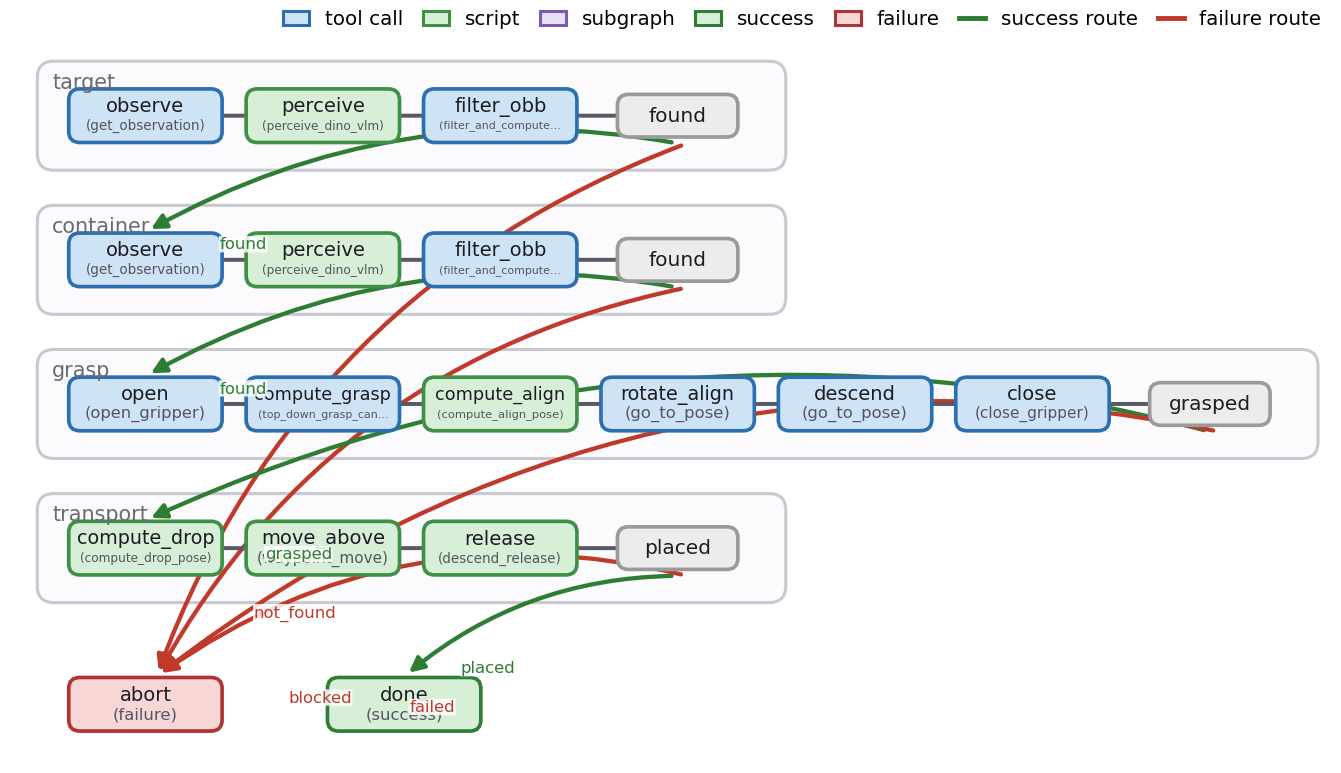
Run it like any other graph:
gap run my_graph --validate-only
The build_a_graph example
(source) is the full program this
walkthrough mirrors — including the dump_checkpoints_module sidecar, the
recovery actions on abort, and an optional --execute flag that runs the
built artifact on the LIBERO sim end-to-end.
Exits: add_exit vs set_exit_router#
A subgraph declares how it reports its outcome, in one of two mutually exclusive modes (validation rule S11):
add_exit(name)— the common case. Creates a terminalnoopnode and registers its name as a success value; the exit value is whichever terminal node the run reaches. Call once per success outcome. With this mode,exit.router_fieldstaysnulland every success value must be a declarednoopnode name.set_exit_router(router_field=..., success_values=[...])— for data-dependent exits. The exit value is read from the named field of the terminal node’s output; success values must not collide with node names. Nonoopmarkers are created — you wire your own terminal node whose output containsrouter_field.
triage = Subgraph(name="triage_sg", skill="generic")
triage.add_node("classify", type="script", script="scripts/classify.py")
triage.add_edge("START", "classify")
triage.add_edge("classify", "END")
# classify's run() returns {"verdict": "clean" | "cluttered"}
triage.set_exit_router(router_field="verdict",
                       success_values=["clean", "cluttered"])
Calling add_exit() after set_exit_router() raises BuilderError;
calling set_exit_router() replaces any previously declared exit outright.
set_on_error(value) declares the failure-path exit symbol: any
exception raised inside the subgraph becomes that exit value, which top-level
conditional edges can route on. on_error is a symbol, never a node — it
must not collide with a node name (S9) and must not be a conditional-edge
target inside the subgraph (S10). Without on_error, an in-subgraph
exception crashes the whole workflow. The resolved exit must land in
success_values ∪ {on_error} or the run raises PipelineError.
Ordering of $ref producers (S12). The executor is a frontier scheduler
with no join barrier: a node is enqueued as soon as any in-edge source
completes. A node that consumes Ref("P.*") is therefore only valid when P
is an ancestor of every other node whose completion can enqueue the consumer —
wire the producer on the same path (a chain), not on a parallel branch that
joins at the consumer. A parallel “diamond” (e.g. observe → perceive_item
racing observe → … → filter_obb into a shared decide) fails validation
with S12; at runtime it would intermittently resolve the $ref before the
producer ran. Streaming producers are exempt (consumers read their latest
published snapshot).
Outputs#
set_outputs(**bindings) binds named subgraph outputs to internal node
fields. Every value must be a Ref(); the call replaces any
previously set outputs (it does not merge):
see.set_outputs(
    target_obb=Ref("fit_obb.obb"),
    target_mask=Ref("perceive.mask"),
    target_cloud=Ref("perceive.cloud"),
)
Output names are the cross-subgraph contract: a downstream subgraph input
binds to whichever upstream subgraph most recently published an output of
the same name. Outputs may only bind to declared, non-end nodes (S6). An
output whose Ref fails to resolve on a given exit path is silently
unbound — see Patterns and pitfalls.
Checkpoints#
add_checkpoint declares a postcondition for the subgraph, evaluated
against a privileged world snapshot every time the subgraph exits on a
success path (skipped on the on_error path):
grab.add_checkpoint(
    "target_held",
    lambda world: world.body("alphabet soup").is_grasped(),
    rationale="After close, the target must actually be held.",
    validate=True,        # hard postcondition (default); False = probe only
    weight=1.0,
)
The predicate takes a gap.runtime.verify.World snapshot — or
(world, outputs) where outputs are the subgraph’s bound outputs; arity
is auto-detected. Declaring more than 6 checkpoints on one subgraph emits a
UserWarning (keep verification focused). Enforcement modes and the
World/Body predicate vocabulary are covered in
Checkpoints; enforcement requires a connector
with ground truth (world_snapshot), i.e. simulation.
Important
Hand-authors write the sidecar by hand
Checkpoints are never part of workflow.json. The executor loads them
from a sidecar module at <workflow_dir>/checkpoints/<subgraph_name>.py
exporting CHECKPOINTS: list[Checkpoint]. Subgraph.dump_checkpoints_module(path)
can generate that sidecar, but it needs the original builder source block,
which only the gap.agent generation pipeline injects — on a hand-built
Subgraph it raises BuilderError. When authoring by hand, write the
sidecar file directly, like the quickstart example does:
# <workflow_dir>/checkpoints/grasp_sg.py
from gap.runtime.verify import Checkpoint


def _target_held(world) -> bool:
    """The soup can is in contact with a robot link after `close`."""
    return world.body("alphabet soup").is_grasped()


CHECKPOINTS = [
    Checkpoint(
        name="target_held",
        subgraph="grasp_sg",
        predicate=_target_held,
        rationale="Ground-truth contacts prove the gripper closed ON the object.",
        validate=True,
    ),
]
WorkflowSpec and declare_subgraph#
WorkflowSpec is the third builder: a workflow scaffold that fixes the
topology (which subgraphs run, in what order, with what exits) without
filling in any subgraph’s nodes. The generation pipeline’s coordinator emits
one; per-subgraph agents fill in the bodies afterwards. You will rarely need
it for hand authoring, but it defines the canonical metadata stub:
from gap.builder import WorkflowSpec

spec = WorkflowSpec(name="pick_into_basket")
spec.declare_subgraph(
    "grasp_sg",
    skill="grasping-direct-ik",
    description="Grasp the perceived target with a top-down direct-IK grasp.",
    exit_success_values=["grasped"],   # required, non-empty
    on_error="failed",                 # required
    inputs={"target_obb": "OrientedBoundingBox"},   # {name: type-name} declarations
    stage="grasp",                     # optional: "grasp" | "transport" | "place"
)
spec.add_subgraph_node("grasp", ref="grasp_sg")
spec.add_end("done", status="success")
spec.add_end("abort", status="failure")
exit_success_values= and on_error= are required keyword arguments with
no defaults. inputs/outputs here are {name: type_name} declarations,
not data bindings — the dataflow is established later by name matching.
Save, load, round-trip#
Workflow.save(path, validate=True)— serialize to JSON; parse with the strict runtime parser and run the structural validator (rules W1–W8 and S1–S12) first, raisingGraphValidationErroron any error-severity issue. Passvalidate=Falseto skip checks (e.g. when serializing an intentionally partial graph).Workflow.load(path)— strict-parse an existingworkflow.jsoninto a fresh mutable builder. Round-trip throughto_dict()is byte-equivalent for any validworkflow.json, so load–edit–save is a safe way to patch generated graphs.Subgraph.save(path)/Subgraph.load(path_or_dict)— standalone subgraph JSON with a wrapping"name"field. Saving runs S1–S12 by embedding the subgraph in a stub workflow. This wrapped form is non-canonical: the executor only consumes subgraphs inside a workflow’ssubgraphsmap. Use it to hand a subgraph between processes, not as a runnable artifact.to_dict()on any builder returns the exact JSON shape, if you want to pass the graph straight togap.executewithout touching disk (dicts are materialized to a temp directory — script nodes then need their files staged there, so prefer a real directory once scripts are involved).
Next steps#
Graph patterns and pitfalls —
$refpath syntax, by-name binding hazards, loops, streaming, units.Workflow schema reference — the normative JSON contract this API serializes to.
Executor semantics — how the scheduler runs what you authored.
Running graphs —
gap runflags, sim targets, traces.Generating graphs from language — let the LLM pipeline author the same artifact.